Showing posts with label Useful Information. Show all posts

How to Use Reliance Jio 4G Sim in 3G Phone


Remember use this trick at your own risk because this Method is a little bit risky , so please do follow the exact steps , we are not be responsible for any damage which can happen to your mobile. This method will solve How to Use Reliance Jio 4G sim in 3G phone.

Method 1: Mediatek Processor Only

Before start using this method , check your mobile device specs whether it has mediatek chipset or not. Android version 4.4 will be more preferred i.e Kitkat version. Guys please check your android version, if that didn’t work try restarting your mobile 1-2 times by clearing cache. Incase if you have any doubts comment below, I will help you out. Guys this method is working but you should follow the exact steps, here I am giving one trick to check whether your device is running on mediatek processor on not. The method 1 steps have been changed a little bit but the process is same.

Checking Device for Mediatek or Qualcomn Processor:

  1. First Download CPU Z app from Playstore: Click Here
  2. Install and open this app.
  3. Wait while it retrieves your device information.
  4. Within few seconds you will see all your device information on the screen.
  5. If your device is using Mediatek Chipset then it will reflect with the Logo of Mediatek Chipset on the screen.
Suggestion: You need to activate your sim before going to do this process, if you jio sim isn’t activated then check out the process from this article.

  •  First Download & Install MTK Engineering Mode app in your 3G mobile device.
Download from here
  • This Application will allow you to run an advanced Setup from the Engineering Mode Menu of MTK phones, which is also called SERVICE MODE
Note This: Use this secret menu very carefully. In case if you don’t know on what you are doing then just stop it or don’t do it!!

  • Open the installed app, or dail your mobile device specific code for Engineering Mode
  • Click on the MTK Settings and Select Preferred Network Option.
  • Now you can Select 4G LTE/WCDMA/GSM as network mode and you can save it and turn it off and on your mobile device
  • Once you done the above steps, Shutdown the device
  • Insert your Reliance Jio 4G sim in 1st Slot and keep the 2nd Slot empty.
  • Switch on the device and then you will see jio sim network.
Holla!! Within 10 minutes you will now get the Jio Network but you will not get the 4G speed still you will get 3G speed. Which is also better.. If you got other device or above method isn’t working go with this process for Reliance Jio 4G Sim in 3G Phone trick.

Method 2: Qualcomm Chipset Devices (Tested In Redmi 1s and Moto G Series)

Check Your Mobile Specifications does It Has Qualcomm Chipset Or Not. Version 4.4 Kitkat Android Devices Will Be More Preferable. 
  • Download Shortcut Master (Lite) App From Here
  • Install the app & Open It.
  • Click on Menu (vertical Three Dots on top right side)
  • Now Go To Menu then Search for “Service Menu” Or ” Engineering Mode “
  • Then Select “System App” Option For Deep Search. If Found then open it and access to change LTE Bands If that doesn’t work,
  • Once You Got the Engineering Mode , Open It and Select Change LTE Bands.
  • If the above Doesn’t Work Then Dial *#2263# then Select Menu And Click Back Again Then Select Menu.
  • Then Go To Key Input And Enter “0000” without quotes, Then Wait For Couple Of Seconds ,after that You Will Get Popup.
  • Select UE Settings From that Popup, after that Select setting>protocol>NAS>Network Control>Band Selection>LTE Band> The Select “Band 40”.
  • Hola Done Now. Now you can Insert Jio Sim & Check Whether You Are Getting Signals Or Not.
  • Restart the Device and Place it in First Sim Slot
  • If You Have Any Issue Feel Free To Comment Or Contact Us, I will surely help you

Method 3: For Moto G and Moto E Users Tested on 1st Generation: (VIDEO PROOF)

Latest news as so many people didn’t understood this step so I am here to show you the 100% working video proof for Moto G users, this is tested on 1st and 2nd generation. Just follow the steps carefully if you have any doubts feel free to ask me in the comments.
  • First visit the Dial-pad, and type this number *#*#4636#*#*
  • Then you will see one page with Testing, click on Phone Information


Scroll down till you find the Set Preferred Network Type drop down menu, click on that


Select the LTE/GSM auto (PRL) option and close it


  • Switch off your mobile put Jio Sim in slot 1 and keep the second slot empty.
  • Switch on now then you will see Jio 4G signal in your mobile


Note :- By Using This Trick , You Device Seems As 4G Compatible For Jio Sim But Actually It Will Receive 3G Network . This Trick Will Not Convert Your Device From 3G To 4G , It Will Only Deceive Jio Sim To Catch 3G Network On Your Device.

Reliance Jio 4G SIM will work on these devices: Here is the full list

Reliance Jio 4G services will be open for anyone to avail from September 5. Here is the full list of compatible 4G/LTE devices that work on Jio network for data:


Reliance Jio 4G services will be open for anyone to avail from September 5. However, there is still a lot of confusion in the market on whether the SIM is going to work with all smartphones.


The answer is no. The Reliance Jio 4G service is exactly what it says, a 4G service. There is no 2G or 3G signals so phones that are not 4G compatible will not work on this network. So which are the phones that work on the service? Jio has already announced partnerships with Samsung, HTC, Micromax, Sony, Vivo, Intex, Lava, Gionee, Panasonic, Asus, Xolo, LG, Karbonn, Videocon, YU, Sansui, Alcatel and TCL. Here is the full list of compatible devices from Reliance Jio and its partners. The list as 177 TRUE 4G / VoLTE smartphones.
Reliance LYF
Reliance LYF Earth 1, Reliance LYF Earth, Reliance LYF Flame 1, Reliance LYF Flame 2, Reliance LYF Flame 3, Reliance LYF, Flame 4, Reliance LYF Flame 5, Reliance LYF Flame 6, Reliance LYF Flame 7, Reliance LYF Flame 8, Reliance LYF Water 1, Reliance LYF Water 10,
Reliance LYF Water 2, Reliance LYF Water 3, Reliance LYF Water 4, Reliance LYF Water 5, Reliance LYF Water 6, Reliance LYF Water 7, Reliance LYF Water 8, Reliance LYF Wind 1(16GB), Reliance LYF Wind 1(8GB), Reliance LYF Wind 2, Reliance LYF Wind 3, Reliance LYF Wind 4, Reliance LYF Wind 5, Reliance LYF Wind 6, Reliance LYF Wind 7
Samsung A8 VE (SM-A800I), Samsung Galaxy A5 (SM-A500G), Samsung Galaxy A5 (2016) (A510FD), Samsung Galaxy A7 (SM-A700FD), Samsung Galaxy A7 (2016) (A710FD), Samsung Galaxy A8 (SM-A800F), Samsung Galaxy Core Prime 4G (SM-G360FY), Samsung Galaxy J2 (2016) (SM-J210F), Samsung Galaxy J3 (2016), Samsung Galaxy J5 (SM-J500F), Samsung Galaxy J7 (SM-J700F), Samsung Galaxy te 4 (SM-N910G),  Samsung Galaxy te 4 Edge (SM-N915G),  Samsung Galaxy te 5 (SM-N920G),  Samsung Galaxy S6 (SM-G920I),  Samsung Galaxy S6 Edge (SM-G925I),  Samsung Galaxy S6 Edge Plus (SM-G928G), Samsung Galaxy-J2 (SM-J200G),  Samsung J Max,  Samsung J5 (2016) (SM-J510F),  Samsung J7 (2016) (SM-J710F), Samsung te 5 Duos (SM-N9208), Samsung ON5 (SM-G550FY), Samsung ON5 Pro(SM-G550FY), Samsung ON7 (Mega On – SM-G600FY), Samsung ON7 Pro(SM-G600FY), Samsung S7 (SM-G930F), Samsung S7 Edge (SM-G935F), Samsung Galaxy J2 Pro, Samsung Galaxy te 7, Samsung Z2
Asus
Asus Zenfone 3 Deluxe ZS570KL, Asus Zenfone 3 Ultra (ZU680KL),  Asus Zenfone 3 ZE552KL (Libra), Asus Zenfone 3 Laser ZC551KL (Scorpio), Asus Zenfone 3 ZE520KL (Leo)
BlackBerry
BlackBerry Priv (STV100-3)
Coolpad
Coolpad Max, Coolpad Mega 2.5D (Y83)
Gionee
Gionee F103 (2 GB), Gionee S Plus,  Gionee F103 (3 GB), Gionee Elife S6,  Gionee M5 Plus, Gionee P5L, Gionee F103 pro, Gionee S6s 

Infocus
Infocus M370, Infocus M535, Infocus M680, Infocus M370I, Infocus M535+
Intex Cloud String, Intex Aqua Eco 4G, Intex Aqua 4G, Intex Aqua Ace 2,  Intex Aqua Craze,  Intex Aqua Power 4G, Intex Aqua S7, Intex Cloud String V2.0, Intex Aqua Ace Mini, Intex Aqua Strong 5.1, Intex Aqua Raze, Intex Aqua 4G Strong, Intex Aqua Shine 4G, Intex Aqua Music, Intex Aqua Secure, Intex Aqua View
Karbonn
Karbonn Aura,  Karbonn Quattro L45 IPS, Karbonn Quattro L55 HD, Karbonn Aura Power
Lava
Lava X10, Lava X28, Lava X81, Lava V5, Lava X50, Lava A71, Lava A72, Lava A88, Lava A76, Lava A89, Lava X46, Lava X38, Lava X38 (2GB), Lava X17, Lava X11
LeEco
LeEco Le 2, LeEco Le Max 2
Lenovo
Lenovo Vibe Shot
LG
LG XCAM (K580i),  LG X Screen (K500I), LG Google Nexus 5x (LG-H791),  LG G4 Stylus 4G, LG G5, LG Spirit 4G H442, LG K7, LG K10, LG Stylus 2 Plus, LG K520 – Stylus 2
Micromax
Micromax YU Yunique Plus, Micromax YU Yunique YU4711, Micromax Canvas Sliver 5 (Q450), Micromax Canvas Amaze (Q491), Micromax Yu Yuphoria (YU5010A), Micromax Yu te (YU6000), Micromax Canvas Mega 2 Q426
Motorola
Motorola Moto G (3rd Gen), Motorola New Moto E (Moto E 2nd Gen), Motorola Moto X Play, Motorola G Turbo, Motorola G4, Motorola G4 Plus
Oneplus
Oneplus Oneplus 3
Onida
Onida I4G1
Oppo
Oppo F1, Oppo A37, Oppo F1 Plus, Oppo F1S


Panasonic

Panasonic P55 vo 4G, Panasonic Eluga Arc 2, Panasonic Eluga I2 (2gb), Panasonic Eluga I2 (3gb), Panasonic Eluga Arc, Panasonic Eluga Icon 2, Panasonic Eluga I3, Panasonic Eluga A2, Panasonic Eluga


Sony 

Sony Xperia Z5 Dual (E6883), Sony Xperia Z5 Premium Dual, Sony Xperia X (F5122)


TCL

TCL 560, TCL 562

Videocon
Videocon Krypton 3 V50JG, Videocon Graphite 1 V45ED (4 Band), Videocon Graphite 1 V45ED (6 Band), Videocon Q1


Vivo
Vivo Y21L,  Vivo V3, Vivo V3 Max

Xiaomi
Xiaomi Redmi 2 Prime (H2X), Xiaomi Redmi te 3 (H3A), Xiaomi Mi5, Xiaomi Mi Max, Xiaomi Redmi 3s, Xiaomi Redmi 3s Prime

Xolo
Xolo Era 4G

Below is the full list of compatible 4G/LTE devices that work on Jio network for data:

Reliance Jio - Complete Tariff & all amazing plans


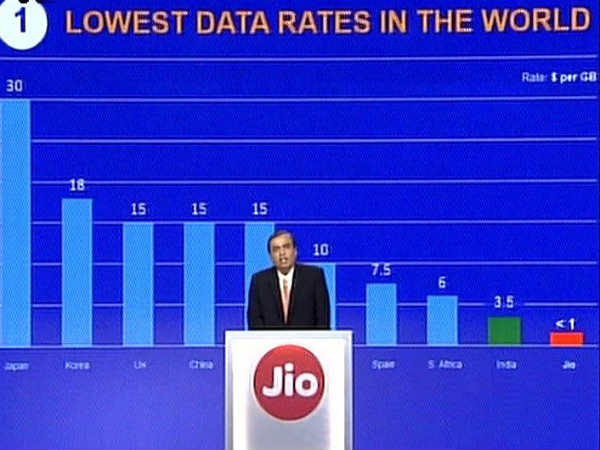
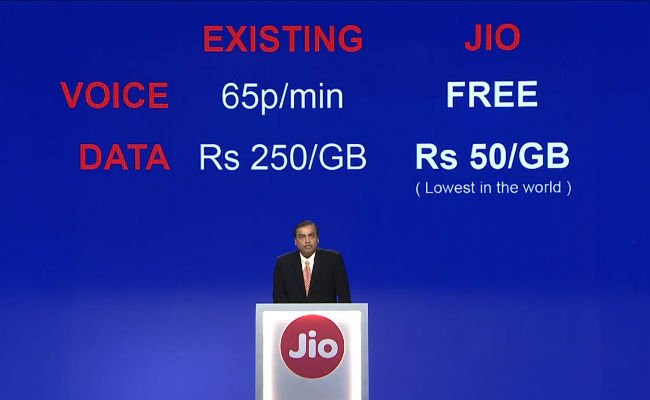
Reliance’s AGM is underway, and Mukesh Ambani has just announced the Internet plans that Jio will be offering. Ambani stated that Jio customers will never pay for calls and text messages, and using more data will reduce your cost per MB. All of Jio’s plans are accompanied by free data at night, and access to Jio’s apps. If you’re a student, you will be able to get 25% more data on the Reliance Jio network as well.

Without further ado, here are all the Reliance Jio data packs that will be available:


How to Get Reliance Jio Sim Without Lyf Phone


Just follow these steps on a qualifying smartphone:
  1. Download & Open MyJio App from Play Store
  2. Tap on Get Jio SIM on the Banner
  3. Tap on Agree & Get Jio offer
  4. Select your location from the drop down
  5. Read through the steps and click on Next
  6. Offer Code can be viewed on the screen. Note down your offer code.
Once that's done, you will get a bar code that you need to take to a Reliance Digital where you have to show your phone and you'll get a SIM. Remember to carry a photograph for the form, and your photo ID, and the staff will do the rest. Quick tip: in our experience - and what many other people online are also telling us - the Reliance Digital Xpress Mini Stores are much more efficient about this process than the larger Reliance Digital stores.
Note that though only a few phones qualify for the Reliance Jio SIM under this offer, you can still use this SIM on other phones if you want.
 The Reliance Jio SIM Preview offer
The partner offer is the easiest way of getting a Reliance Jio SIM if you have any of the eligible phones. As of writing this report, the Jio Preview offer has been extended to smartphones by Samsung, HTC, Micromax, Sony, Vivo, Intex, Lava, Gionee, Panasonic, Asus, Xolo, LG, Karbonn, Videocon, YU, Sansui, Alcatel, and TCL.

he complete list of smartphones is as follows:
Samsung phones
Grand Prime 4G, Galaxy J1, Galaxy J2, Galaxy J7, Galaxy J5, Galaxy S5 Plus, Galaxy A5, Galaxy A7, Galaxy Core Prime 4G, Galaxy S6, Galaxy J3 (2016), ON7, Galaxy A8, Galaxy S6 Edge, ON5, Galaxy Note 5, Galaxy Note 4, Galaxy Alpha, Galaxy S6 Edge Plus, Galaxy Note 4 Edge, Galaxy Note 5 Duos, Galaxy S5 Neo, S7, Galaxy A5 (2016), Galaxy A7 (2016), S7 Edge, A8 VE, J5 (2016), J7 (2016), ON5 Pro, ON7 Pro, Galaxy J2 (2016), J Max, Galaxy A9, Galaxy A9 Pro, Galaxy C5, Galaxy C7, Galaxy J2 Pro, Galaxy Note 7.
LG phones
K332 (K7 LTE), K520DY (Stylus 2), K520DY, H860 (LG G5), K500I (X Screen), K535D (Stylus 2 Plus), LGH630D (G4 Stylus 4G) & LGH 442 (LGC70 Spirit LTE)
Micromax phones
Bolt Selfie, Canvas 5, Canvas 5 Lite, Canvas 5 Lite Special Edition, Canvas 6, Canvas 6 Pro, Canvas Amaze 4G, Canvas Blaze 4G, Canvas Blaze 4G Plus, Canvas Evok, Canvas Fire 4G, Canvas Fire 4G plus, Canvas Fire 6, Canvas Juice 4G, Canvas Knight 2, Canvas Mega 2, Canvas Mega 4G, Canvas Nitro 4G, Canvas Pace 4G, Canvas Play 4G, Canvas Pulse 4G, Canvas Sliver 5, Canvas Tab, Canvas Unite 4, Canvas Xpress 4G, Unite 4 Plus, Unite 4 Pro
Yu phones
Yu Yureka, Yu Yutopia, YU Note, Yu Yuphoria, Yunicorn, Yunique, Yuphoria, Yureka Plus, Yureka S
Asus phones
ZenFone 2 Laser (ZE550KL), Zenfone 2 (ZE551ML), Zenfone Max (ZC550KL), Zenfone 2 Laser 5.0 (ZE500KL), Zenfone 2 (ZE550ML), Zenfone Selfie( ZD551KL), Zenfone 2 Laser (ZE601KL), Zenfone Zoom(ZX551ML), Zenfone Go 5.0 LTE (T500), Zenfone 3 ZE552KL, Zenfone 3 Laser( ZC551KL), Zenfone 3( ZE520KL), Zenfone 3( ZS570KL), Zenfone 3( ZU680KL)
Gionee phones
E8, F103 Pro, F103(1GB), F103(2GB), F103(3GB), M4, M5, M5 Lite, M5 Lite CDMA, M5 Plus, P5L, S Plus, S6, S6s, S7, V6L
Karbonn phones
Aura 1, Aura Power, Quattro L45 IPS, Quattro L50 HD, Quattro L51 HD, Quattro L52 VR, Quattro L55 HD
Lava phones
A71, A72, A76, A76 Plus, A88, A89, A97, Ivory s 4g, Lava V5 M, Pixel V2, V2s, X10, X11, X12, X17, X28, X38, X41, X41 Plus, X46, X50, X50 Plus, X81
Xolo phones
Black-1X M, era 1X, era 2X, era 4G, era 4K, era X
Panasonic phones
ELUGA L, ELUGA Switch, ELUGA Icon, T45, ELUGA I2 ( 1GB ), ELUGA L2, ELUGA Mark, ELUGA Turbo, ELUGA Arc, ELUGA I2 2GB, ELUGA I2 3GB, ELUGA I3, ELUGA Icon 2, ELUGA A2, ELUGA Note, P55 Novo 4G, ELUGA Arc 2, P77
TCL phones
FIT 5.5, Pride T500L, TCL 560, TCL 562
Alcatel phones
OneTouch X1, Pixi 4 -5, POP Star, POP3, POP4
Sony smartphones
Xperia X A, Xperia X A Ultra, Xperia X(F5122), Xperia Z5 Dual(E6883), Xperia Z5 Premium Dual
Videocon smartphones
Graphite1 V45ED, Krypton 3 V50JG, Q1, V50FA3, V50FG6
Sansui smartphones
S50 FD45S
HTC smartphone
Desire 626 dual SIM, Desire 628, Desire 630, Desire 728 Dual SIM, Desire 820, Desire 820Q, Desire 820S Dual SIM, Desire 825, Desire 826, Desire 826 DS, Desire 828 DS, Desire 830, Desire Eye, HTC 10, HTC 10 Life style, One A9, One E9 S dual SIM, One E9+ Dual SIM, One M8, One M8 Eye, One M9 Plus, One M9e, One ME Dual SIM, One X9


Also like our Facebook page to get updates